
Windows app
DiskMapper
A visual Windows partition manager for Windows Server and Windows 11 that resizes, extends, reorders, and relocates partitions, including system disk layouts.
About this app
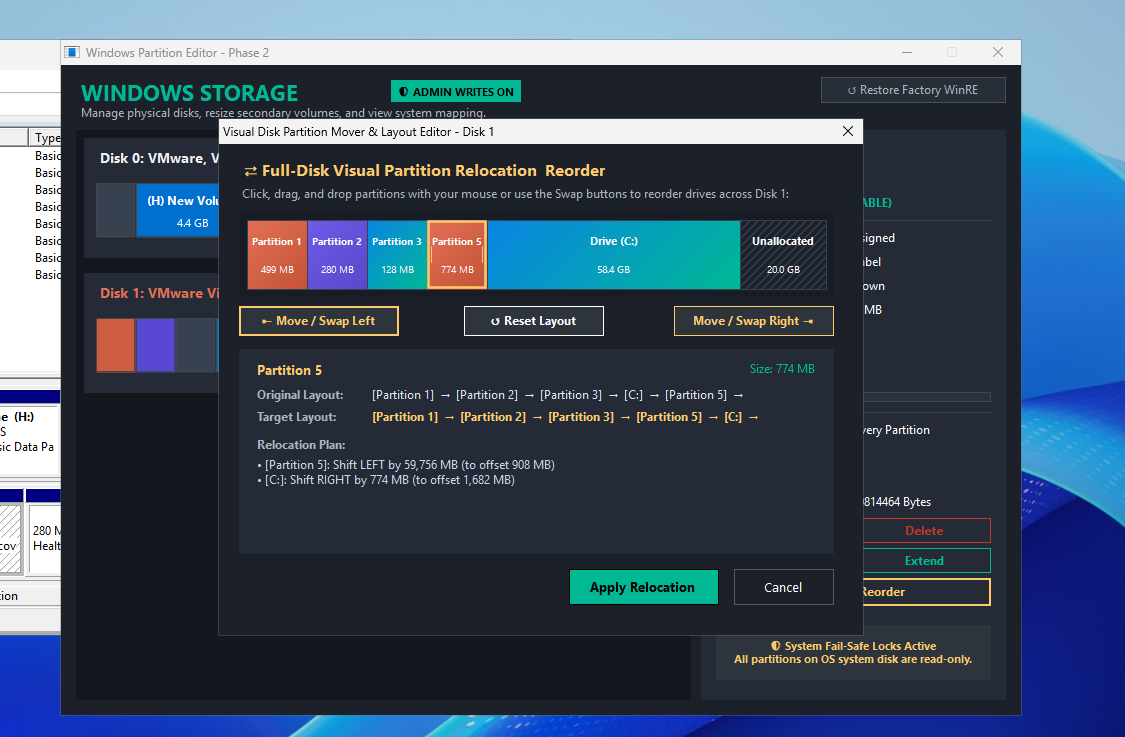
DiskMapper is a visual partition manager for Windows Server and Windows 11. It maps every physical disk and partition, lets administrators resize and extend volumes, and includes a full-disk drag-and-drop layout editor that reorders and relocates partitions, including the Windows system drive and recovery partitions. Each change is previewed as a relocation plan comparing the original and target layouts before anything is written, and fail-safe locks keep the running OS system disk read-only unless writes are explicitly enabled.
Release status
This Windows build is distributed through the official VTech App GitHub Release asset, with a SHA-256 checksum published for verification.
Capabilities
Built for safe partition layout changes
Visual disk maps and previewed relocation plans make partition resizing and reordering easier to plan, verify, and apply.
Preview
Workflow preview
A demo video and screenshots show the current app workflow and interface.
Changelog
- Initial public Windows release is available as a GitHub Release download.
- Includes visual disk mapping, volume resize and extend, full-disk partition relocation and reordering, system disk support, relocation plan preview, and WinRE restore.
Download details
Official release file: